


Pairs well with
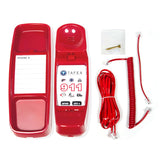
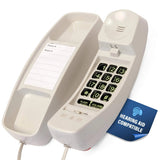

FIRST-M by TAFEA One-Touch 911 Emergency Phone is backordered and will ship as soon as it is back in stock.
You're Safe Shopping With Us


Frequently bought together
Save 5% by buying these together


Frequently bought together


Total price: $0.00
Choose an option for each item to continue
One-touch 911 • Four memory buttons • Emergency listening
Reach 911 with one clearly marked button.
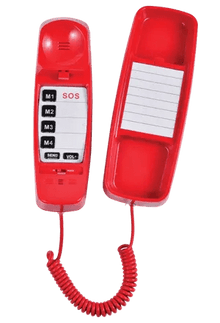
The FIRST-M by TAFEA Emergency Phone puts important numbers on clearly identified memory buttons. M1 is programmed to 911 by default. Lift the handset and press M1 to call 911, or use a programmed M2, M3 or M4 button to reach a family member, caregiver, security desk or other chosen contact.
Prefer automatic dialing as soon as the handset is lifted? Choose the FIRST lift-to-call auto dialer.
Features that support clear communication
- H.E.L.P. emergency listening: During an active call, microphone sensitivity increases if the handset is dropped or left dangling, helping the answering party hear nearby activity.
- Recordable announcement: Record useful location information following the included administrator instructions. The SEND button plays the stored message during an emergency call.
- Loud / Super-Loud volume control: Adjust listening volume for the user and surroundings.
- Ricochet handset cord: A durable coiled cord connects the handset to the phone.
- Desk or wall placement: Keep the phone accessible in a home, care setting, office or shared space. Wall mount sold separately.
- Line-powered operation: No phone batteries or separate phone power adapter required.
FIRST-M or FIRST?
| How you place the call |
FIRST: Lift the handset to call the stored number. FIRST-M: Lift the handset and press a memory button. |
|---|---|
| Default 911 setting |
FIRST: Auto-dial number defaults to 911. FIRST-M: M1 defaults to 911. |
| Custom contacts |
FIRST: One primary auto-dial number. FIRST-M: Four programmable buttons, M1–M4. |
| Telephone connection | Both require active analog telephone service or a compatible analog port. |
At a glance
| Model | FIRST-M by TAFEA |
|---|---|
| Calling action | Lift the handset, then press the desired memory button |
| Default number | M1 is programmed to 911 |
| Memory buttons | Four programmable buttons: M1, M2, M3 and M4 |
| Connection / power | Active analog telephone line or compatible analog port; line-powered |
| Announcement | Recordable message; SEND button playback |
| Dimensions | Approximately 8.5 × 3.25 × 3.25 inches |
| Line cord | Fully modular 14-foot telephone line cord |
| Handset cord | Separate Ricochet coiled handset cord |
| Placement | Desk or wall; wall mount sold separately |
| Certifications | FCC / ETL / UL, as listed by the manufacturer |
Frequently asked questions
Is FIRST-M already programmed to call 911?
Yes. M1 is set to 911 by default. Lift the handset and press M1 to place the call through compatible active telephone service.
Can M1 be changed from 911?
Yes. All four memory buttons can store your chosen numbers. Follow the included instructions and make sure everyone using the phone understands the selected setup.
Does it automatically call when I lift the handset?
FIRST-M uses memory buttons: lift the handset and press the desired button. For automatic dialing when the handset is lifted, choose FIRST.
How does the emergency announcement work?
Follow the included instructions to record your message, including any useful location details. During an emergency call, press SEND to play the stored announcement. The current model instructions also describe automatic transmission after approximately 30 seconds if SEND is not pressed. Verify your recorded message according to the instructions.
What telephone service does FIRST-M need?
Use an active analog telephone line or a compatible analog telephone port. If your service uses a cable modem, fiber terminal, PBX or VoIP adapter, confirm analog-port compatibility and emergency-call routing with your provider.
Will it work during a power outage?
The phone itself is powered by the telephone line and does not need batteries or a separate electrical outlet. It can work during an outage only while the connected telephone service or analog port remains active. Cable, fiber, PBX and VoIP adapters may depend on electricity or backup power.
Does it require an app or monitoring subscription?
FIRST-M does not require an app or a Med-Pat monitoring subscription. Compatible active telephone service is still required, and your provider may charge for that service.
Optional programming is available from Med-Pat Solutions for an additional charge if you would like us to set your preferred contact numbers.
Connection and emergency-call routing depend on your telephone service and installation. Follow the included instructions and your provider's procedures to verify the completed setup.
Have a question about this product?


